<
Knowledge Base · Release Notes
Applies to: Connected 12.0 | Platform: macOS, PC, Connected on Demand | Published: January 2026 · Last updated: February 23, 2026
ARTICLE CONTENTS
- Overview
- General System Wide Enhancements
- General Ledger
- Sales and Receivables
- Sales Orders and Quotes
- Purchasing and Payables
- Inventory and Manufacturing
- Job Costing
- Data Exchange and Importing
- Maintenance and Fixes
- Related Resources
1. Overview
Connected 12.0 is a major update to the accounting and ERP software, available in both Cloud SaaS and Desktop deployments. It is a powerful 64-bit, multi-platform solution (PC and macOS) with native support for Apple M-series chips, and is compatible with Windows 11 and macOS 26 (Tahoe).
NOTE Before updating, review the System Requirements for Connected 12.0. When you're ready, you can request the Connected 12.0 update from our download page. |
2. General System Wide Enhancements
2.1 Modern UI Update and Support for Dark Mode
- All screens and report windows updated with new icons and a modern aesthetic.
- Dark Mode is now fully supported on macOS and PC.
- The default Windows PC font changed from Calibri to Segoe UI.
- Main screens, setup windows, and defaults windows updated with the modern UI.
- New icons follow the currently selected theme on both platforms.
2.2 Connected Mail (aka Email)
A new built-in outbound email protocol eliminates the need for a third-party email client. Connected Mail supports sending order confirmations, customer invoices, statements, purchase orders, and sales quotes, and works everywhere email functionality was previously available.
2.3 Spell Check
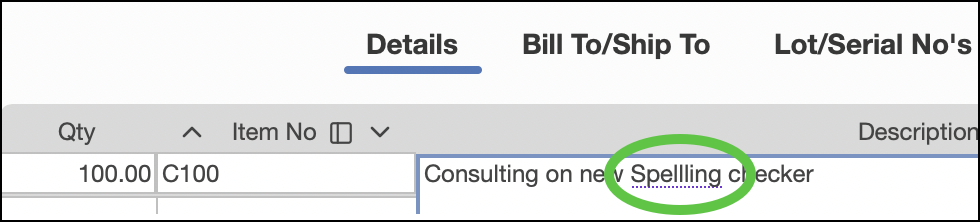
A new spell check is enabled in all Note and Description fields. Incorrectly spelled words are underlined for quick correction.
2.4 Ledger and Query Windows — New Selective Clipboard/Export Options
Four copy options are now available:
- Copy Selection — selected lines only
- Copy Selection with Column Labels — selected lines plus headers
- Copy Selection with Entire Header — selected lines, headers, and report information
- Copy Entire Report — all data including totals and headers
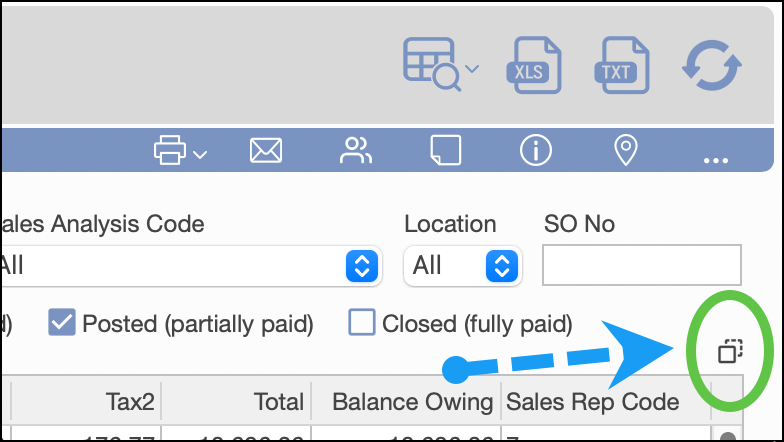
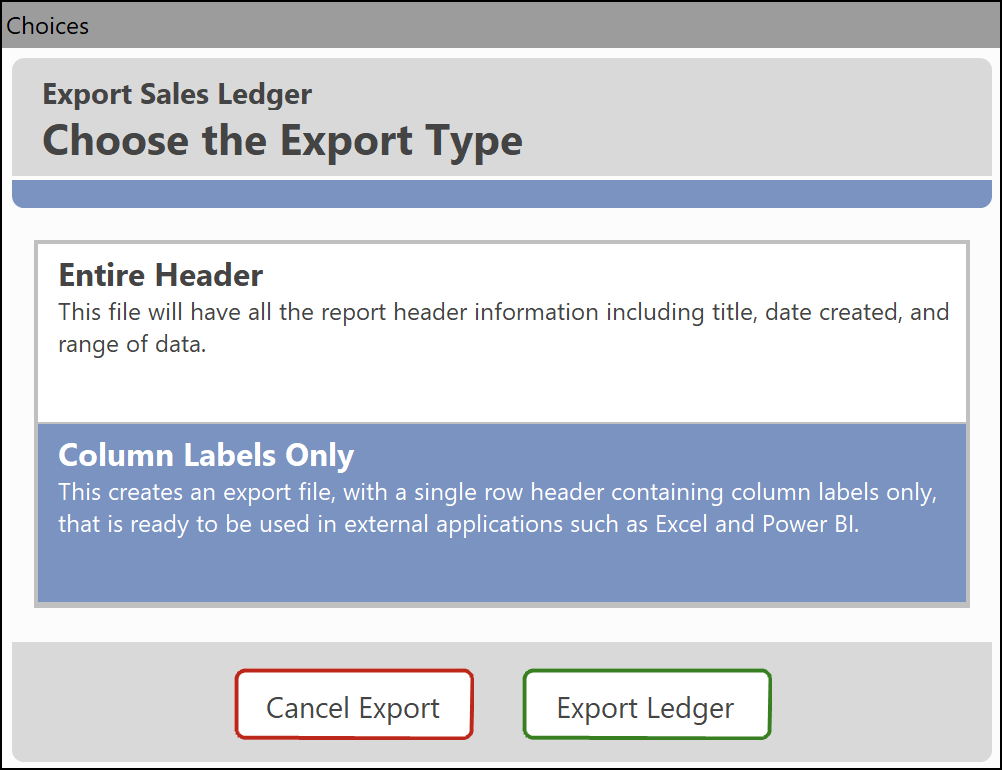
Results can also be exported to Excel or a Text file, with the same header or column label options.
Affected windows:
Customer Query, Vendor Query, Inventory Item Query, Job Query, Sales Quote Ledger, Sales Order Ledger, Sales Ledger, Receipts Ledger, Purchase Orders Ledger, Purchases Ledger, and Payments Ledger.
2.5 Posting Steps Decreased by 25%
The posting process is streamlined so the Preview window appears automatically, eliminating one warning prompt.
2.6 Modern Report Framework Migration
All Connected reports have been migrated to the modern report framework, which supports themes, report notes, and the updated UI. See also My Reports Info for details on customizing report layouts.
2.7 Additional System Wide Enhancements
- ESC Key Handling — Modified in the Sales Quote, Sales Order, Purchase Order, I/C Receiving/Withdrawal, Account Invoice, and Manufacture windows to warn before losing unsaved changes.
- Connected on Demand — Removed an unnecessary printer change notification.
- Backup Window — "Include Attachments" is now OFF by default to expedite backups. See Connected Backup for more.
3. General Ledger
3.1 Import Bank Files for Bank Reconciliation
Bank files from QuickBooks or other formats can now be imported into the redesigned Bank Rec window for transaction matching and clearing. See Importing Bank Statements for Reconciliation for the full walkthrough.
3.2 Journal Entries Report — Condensed Account Summary
A new report type is available that prints only the Account Summary (Account No., Account Description, Debit total, Credit total, Net Total).
3.3 Trial Balance Report
General Ledger Account custom fields are now included when exporting the Trial Balance "Summary" or "Accountant Copy" versions to Excel or a Text file.
4. Sales and Receivables
4.1 Cardpointe Payment Processing
A new customer payment option is available via Cardpointe by Fiserv. The BluePay gateway continues to function normally. Improvements include enhanced PCI compliance, an updated card entry UI, and Hosted Payment Page (HPP) capability so customers can self-serve payments via invoice links or email.
4.2 Customer Receipts (aka Customer Payments)
- Hold Checkbox — Receipts can be placed on hold to omit them from posting until the hold is removed (useful when a payment processing issue needs to be resolved first).
- Receipt Number Field — Extended from 10 to 15 characters to accommodate longer check numbers.
- Email Default — Receipts emailed with a PDF now default to the Payment Receipt version (customer-friendly, and excludes general ledger details).
- Currency Indication — The Payment Receipt now clearly indicates currency when multiple currencies are enabled.
4.3 Recurring Invoices Enhancements
- Post Batch No. — If enabled for Invoices, recurring invoices can now store and pass batch numbers to the corresponding Account Invoices.
- Custom Line Fields — Now supported alongside Custom Sales Fields, and transfer to Account Invoices upon creation.
- Flattened Export — Invoice details can be exported as a Text File or Spreadsheet from the print menu.
4.4 Sales Tax Summary Report
The "Summary" report export is enhanced with a flattened presentation — one row per tax code per reporting period. Columns include: Tax Code, Tax Description, Taxable Total, Nontaxable Total, Invoice Subtotal, Tax 1, Tax 2, Type, City, County, State/Province, Level 1 and 2 tax details (Percent, Label, G/L No., Tax Freight, Tax Surcharge), and the Calculate Tax 2 on Tax 1 option.
4.5 Account Invoice — Detailed Export
A flattened export of the Account Invoice window is now available from the Print menu, useful for checking large invoice information or formatting electronic records.
4.6 Payment Methods — Group on Bank Reconciliation
A new option lets you specify which payment methods are grouped on Bank Reconciliation — for example, grouping checks together while showing EFT/ACH transactions individually.
5. Sales Orders and Quotes
5.1 Sales Order Surcharges
The Customer Surcharge feature is now visible in the Sales Orders window with full feature parity to the Account Invoice. Surcharges appear in the totals section, are editable, and can optionally be included on forms (as dollars and percentage). They're automatically calculated and transferred to the Invoice based on shipped quantity. See Customer Surcharges for setup details.
5.2 Item Alert — Sales Quotes
The Sales Quotes window now supports Inventory Item alerts defined on the Inventory Items window's Alerts tab.
5.3 Batch Number on Sales Orders
Batch numbers for posting separation have been added to the Sales Order window and transfer to the corresponding Invoice upon shipment. Enable this from the A/R Defaults screen's Account Invoice Batch Posting selection.
5.4 Packing Slip Form Total Quantity Fields
The following standard fields have been added to the Packing Slip form:
- Total order qty
- Total ship qty
- Total prev shipped qty
- Total back order qty
6. Purchasing and Payables
6.1 Freight $ and % Allocation for Purchase Order Receivings
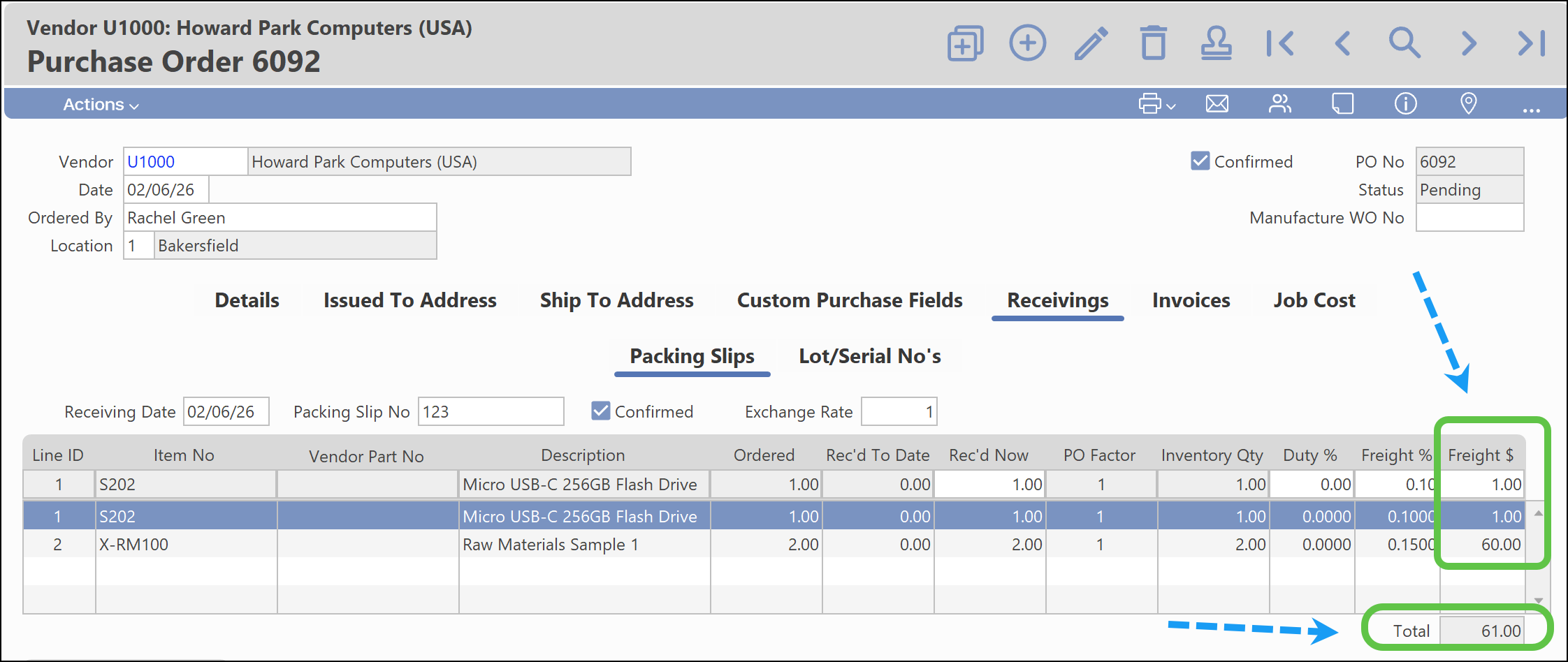
A significant enhancement to cost allocation for inbound freight charges. Previously, only percentage allocation was available; the receiving window now also displays the dollar allocation based on that percentage, with the ability to modify dollar values directly. Total freight is visible for verification across received items, and receivings can be exported to a flat file before posting for validation.
6.2 Last Paid Date Field in Purchases Ledger
A "Last Paid Date" field has been added to the field picker in the Purchases Ledger as a custom column — it's sortable and exportable. See Using the Purchases Ledger for more on custom columns.
6.3 New Field in Purchase Order Receiving Label Print Window
A new custom data field is available for item label printing from Purchase Order Receiving.
6.4 Additional Purchasing and Payables Enhancements
- The Vendors window's alerts and comments tab has been rearranged with layout changes.
- Multiple new EFT/ACH payment export formats have been added and are ready for use.
7. Inventory and Manufacturing
7.1 Inventory Item No. Length Increased from 15 to 25 Characters
The Item No. field has been extended from 15 to 25 characters to accommodate longer part numbers, while continuing to support the "Long Item No." field for codes exceeding 25 characters. Window layouts have been enhanced with horizontal resizing applied across multiple windows and reports. See Inventory Item No Field Length — Increase from 15 to 25 Characters for the full details.
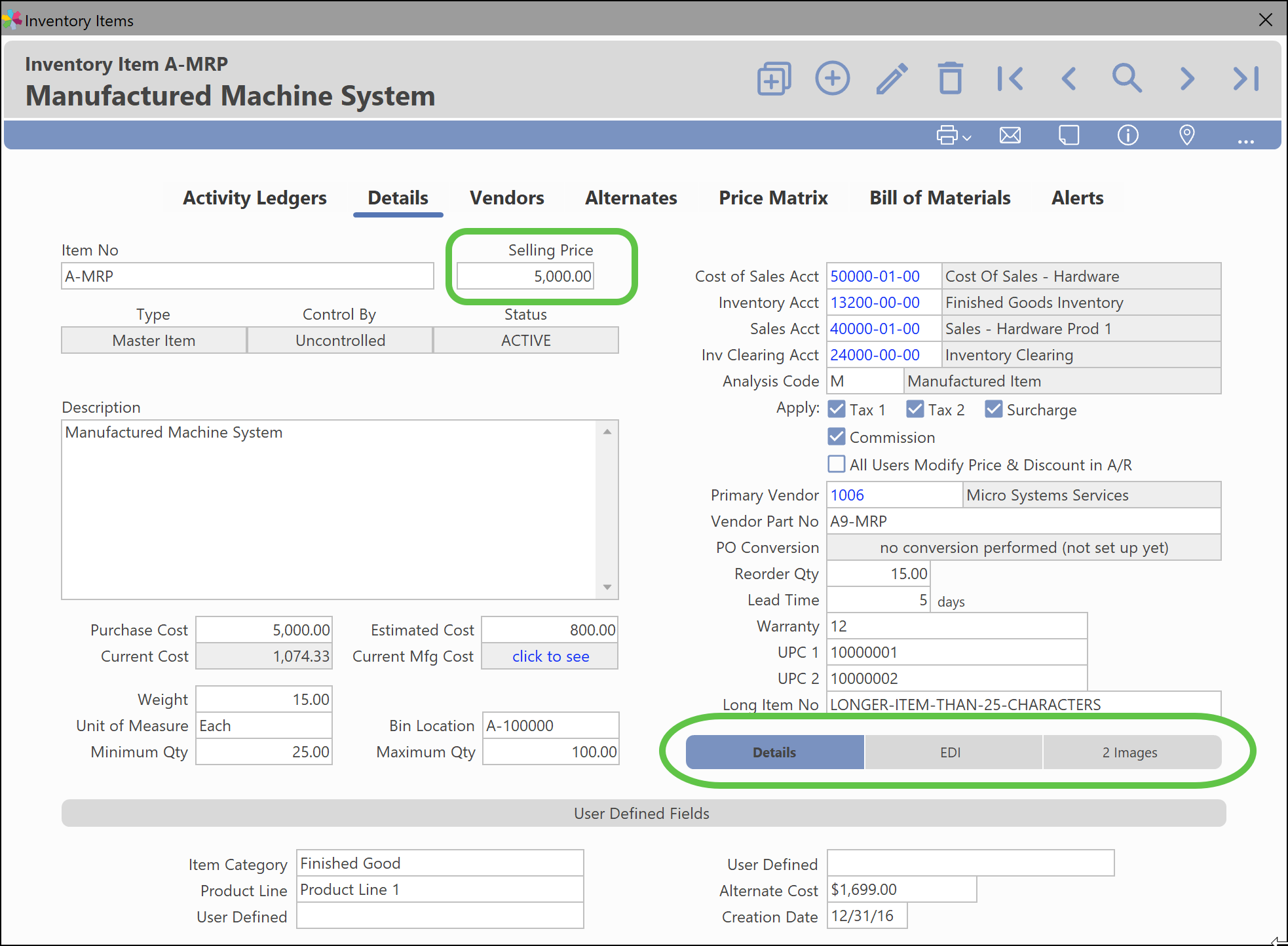
7.2 Inventory Item Details — New Layout
The Details tab of the Inventory Item window has been redesigned:
- Key fields like "Selling Price" are positioned more prominently and in a more logical order.
- Less frequently used tabs ("EDI", "Images") are now nested in the bottom right.
7.3 Bin Number Field Length Increase
The Bin Number field has been extended from 12 to 20 characters to support longer inventory location identifiers.
8. Job Costing
8.1 Timesheets Window — Print to Spreadsheet/Text File
A single timesheet can now be exported from the Print menu's Text File/Spreadsheet option as a flattened file of the timesheet's details.
9. Data Exchange and Importing
9.1 Data Exchange Enhancements
- A new option supports Purchase Order (Header and Details) export job creation.
- A new FTP Destination is available for export jobs, enabling external data transfer.
- A new option supports automated backup jobs via Data Exchange.
- A new option creates email notifications for data exchange jobs and backups.
9.2 Import Support for CSV File Types
All modern imports that support the modern import framework now accept Tab Delimited Text and Comma Separated Values (CSV) file types. The modern framework supports custom field order, an import preview, and importing directly from that preview.
Framework-configured imports:
- Payroll
- G/L Transactions
- Quick Invoices
- Customer Payments
- Sales Quotes
- Purchases — Detailed
- Quick Payments (Vendor)
- Purchase Order Receivings
- Expense Reports — Individual, from the Expense Reports window
9.3 Account Mapping for G/L Transactions Import
G/L Transactions import now supports Account mapping. Accounts from different sources using different formats can be mapped to the corresponding Connected G/L Accounts for continual data transfer, and multiple entries can be imported at once with custom mapping (previously, only single payroll import entries were supported).
9.4 Jobs Import Utility
A new utility has been developed for Job Imports. Since jobs are typically added in bulk during new file setups, this utility is available by request only.
10. Maintenance and Fixes
| Issue | Category | Resolution |
|---|---|---|
| 05262 | A/R Sales Order Ledger | Resolved Sales Rep Code and Web Order No. appearing blank on spreadsheet export. |
| 05271 | I/C Work Order Ledger | Resolved data misalignment caused by hidden delimiters. |
| 05331 | Email/Contacts A/R | Resolved blocking of the "Email Invoices & Statements" checkbox selection. |
| 05409 | I/C Inventory Movement Detail Report | Resolved Reverse Manufacture displaying as Manufacture. |
| 05418 | Email Customers/Vendors Contacts | Resolved a false error with 256+ contacts. |
| 05613 | ODB Admin | Resolved the data version listing display. |
| 05416 | A/P Expense Reports | Resolved a false error when approving reports with Job Allocations. |
| 05410 | I/C Inventory Movement Detail | Resolved the Reverse Manufacture description. |
| 05614 | I/C Price Tables | Created a utility to remove orphaned item references. |
| 05403 | A/P Payments | Resolved a payment details sorting display issue. |
| 05377 | Forms/Forms Editor | Resolved an incorrect Currency Code display on the Invoice. |
| 05366 | I/C Manufacture | Resolved an issue allowing a manufactured item to be used as its own component. |
| 05354 | A/R Sales Order | Resolved inaccurate sales tax calculation with custom line fields. |
| 05363 | A/R Payment Receipt | Fixed field alignment on credit card charge printing. |
| 05356 | G/L Trial Balance Report | Resolved an ending balance calculation inconsistency. |
| 05335 | A/P Purchase Orders | Resolved a missing vendor part number from Manufacture Work Orders. |
| 05334 | A/P Purchase Orders | Resolved a missing vendor part number from Sales Orders. |
| 05281 | A/P Purchase Order Receiving Report | Resolved inactive inventory items not appearing. |
| 05306 | G/L Income Statement Report | Resolved an incorrect Annual Budget column total. |
| 05329 | A/R Sales Reps | Added a check preventing deletion of assigned Sales Reps. |
| 05325 | A/P Purchases | Resolved a posting error caused by a "-" in the PO Number field. |
| 05258 | Forms/Forms Editor Customer Statement | Resolved custom sales field repetition. |
| 05391 | Third Party App Integration | Resolved macOS Tahoe blocking Apple Mail, Outlook, and Excel. |
| 05324 | Third Party App Integration | Resolved an email generation error with embedded item images. |
| 05277 | A/R and A/P Calendar | Resolved a crash caused by rapidly clicking the Calendar icon. |
Was this article helpful?
That’s Great!
Thank you for your feedback
Sorry! We couldn't be helpful
Thank you for your feedback
Feedback sent
We appreciate your effort and will try to fix the article