Tariffs go up. Freight costs spike. A supplier changes terms overnight. None of it shows up in your forecast, and all of it shows up in your cost of goods. For any business carrying inventory, unplanned cost increases aren't a question of if, they're a question of when.
The businesses that come out ahead aren't the ones that avoid the increase. They're the ones with a system that shows them the real cost the moment it happens, so they can decide with confidence whether to absorb it or pass it along.
Connected builds that visibility in from the start. Here are three ways it keeps you in control when costs move, from the second inventory lands on your dock to the second it's invoiced.
| Capture the True Cost the Moment Inventory Arrives |
The Connected Cost Factor rolls freight, duty, tariffs, and even foreign currency adjustments directly into an item's cost the moment it's received. Instead of sitting in a general expense account disconnected from the product it belongs to, that cost becomes part of the item's landed cost, exactly where it belongs.
| EXAMPLE: A $100 ITEM LANDING WITH 5% FREIGHT AND 25% TARIFF | |
| Item Price | $100 |
| Freight (5%) | $5 |
| Tariff (25%) | $25 |
| Total Landed Cost | $130 |
Landed Costs can also factor in foreign currency adjustments when purchasing is done in a different currency, so the number in your system matches what you actually paid. That flows straight into your inventory valuation and your margin calculations, no spreadsheet reconciliation required. Want the full mechanics? Read our guide to The Cost Factor.
| ✗ WITHOUT LANDED COST TRACKING | ✓ WITH CONNECTED |
| Tariffs and freight sit in a general ledger expense account, disconnected from the item. True item cost and real margin are a guess. | Every cost factor rolls into the item at receipt, so inventory valuation and margin are accurate from day one. |
| Choose the Costing Method Built for Volatile Prices |
How you cost inventory shapes your profitability, your taxes, and your financial reporting, and the gap between methods widens fast when tariffs or exchange rates start moving. Connected gives you three ways to cost inventory, so you and your accountant can choose the one that fits the moment.
| Weighted Average Cost Smooths costs across all units on hand. Simple, and reliable when prices are stable, but a sharp increase can quietly understate the cost of what you're selling today. |
| FIFO (First-In, First-Out) • Connected default Relieves inventory at the exact cost it was received. Costs stay accurate as prices rise, which is why FIFO is the default costing method in Connected. |
| Specific Costing Tracks cost by lot or serial number, so the exact cost of the exact unit sold is always the one used, down to the tariff that landed with it. |
In the example above, one unit received at $105 and one at $130 average out to $118 under Weighted Average, but relieve at their true $105 or $130 under FIFO or Specific Costing. In a volatile pricing environment, that difference adds up fast, which is why we recommend FIFO or Specific Costing, alongside your accountant's advice, whenever costs are on the move.
| Decide, Quickly, How to Pass Costs Along |
When costs rise, the fastest way to protect your margin is to update pricing before the next invoice goes out, not after. Connected gives you two ways to do it, and keeps a full history of every change so nothing about your pricing is ever a mystery.
| OPTION A • ADD A SURCHARGE Leave your published prices exactly where they are, and apply a surcharge by item and by customer. Ideal when you're locked into contract pricing or juggling pricing structures too complex to touch. | OPTION B • UPDATE PRICING IN BULK Use the Price Matrix to raise prices across a group of items by a set percentage, based on cost or current selling price, in one pass instead of hundreds of manual edits. |
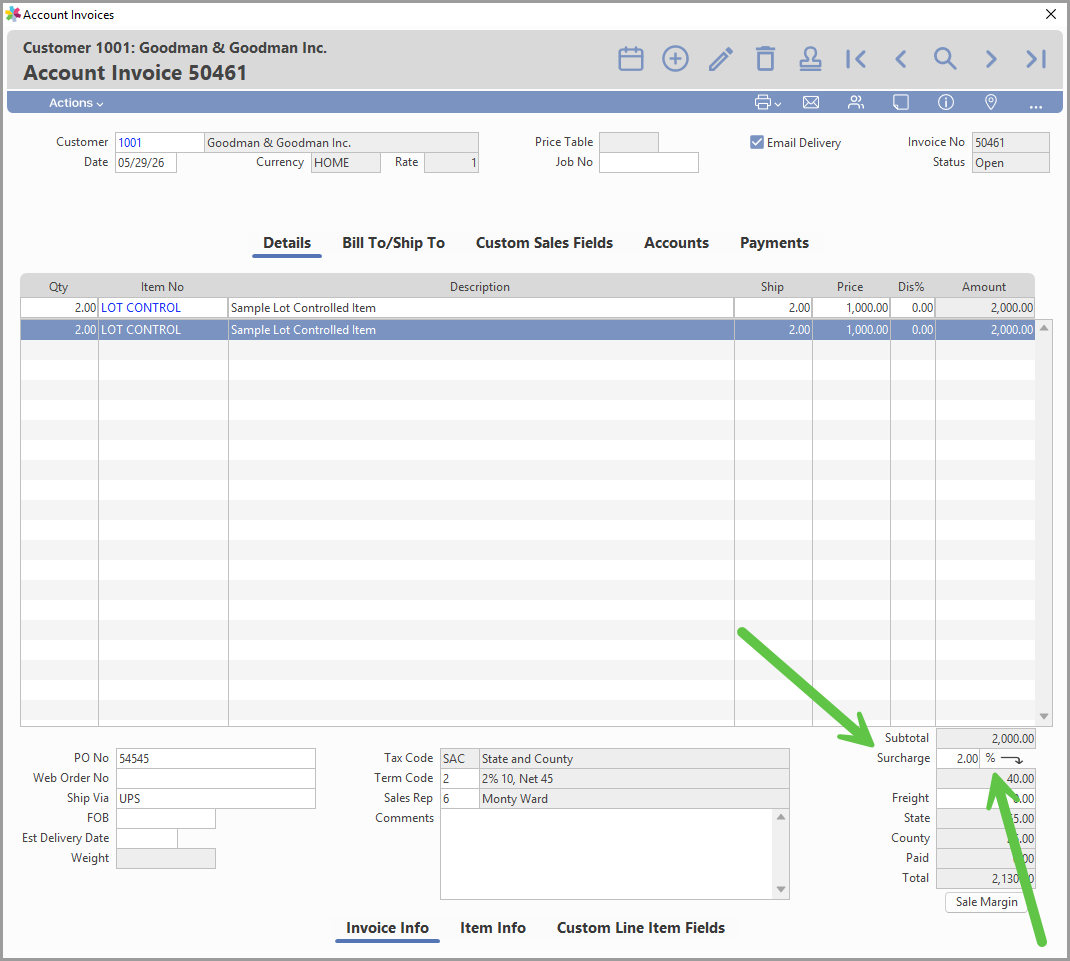
OPTION A • ON THE INVOICE
A surcharge doesn't get buried in the item price. It shows up as its own clean line, calculated automatically on the subtotal and broken out separately from freight, state, and county tax. Your customer sees exactly what they're paying and why, and you can adjust the rate on a single invoice without touching the price of a single item.
OPTION B • PRICE MATRIX BULK RECALCULATION
Set a selling price factor (1.25 means a 25% increase), choose which items to recalculate by cost, vendor, or analysis code, and Connected applies the new prices in a single pass.

Read how Customer Surcharges work, or get the full picture on The Price Matrix and Sales Discount Options.
| “Whether you absorb a cost increase or pass it along, the goal is the same: know your real numbers before you decide, not after.” |
Why Growing Businesses Choose Connected
| None of this is complicated once it's built into your system. Landed costs that capture the real number at receipt, a costing method that fits volatile prices, and pricing tools that update fast without losing your history. That's what turns a tariff headline from a scramble into a plan. |
Costs will keep moving. If you want an accounting and ERP system built to move with them, our team would love to show you what Connected can do for your business.
About Connected
The Connected Accounting and ERP platform, by Accountek Solutions Inc. has been helping SMBs manage their businesses for over 30 years. With our best-in-class Connected on Demand cloud (subscription) and trusted Desktop application for macOS and PC (perpetual license), Connected offers the choices businesses demand. The Connected platform is offered in both Connected Enterprise and a scaled down Connected Core Financials configuration.
To learn which Connected product and platform is best for your business, complete our software Needs Analysis or Download a Free Trial today. If you have questions, call us today @ (888) 678-5856.
Connected Accounting and ERP by Accountek Solutions Inc.
Was this article helpful?
That’s Great!
Thank you for your feedback
Sorry! We couldn't be helpful
Thank you for your feedback
Feedback sent
We appreciate your effort and will try to fix the article