Please Note: This change/article is only applicable to Connected 12.0.00 or greater.
The Connected item number field has been increased from 15 to 25 characters. This can help store long part numbers as the primary lookup, while continuing to use the designated "Long Item No" field for item codes with characters of 26+.
In making this change to Connected, there were many additional enhancements completed to facilitate the long item number. Window layouts were enhanced as well as horizontal resizing to the item number field was applied to many windows and report. The following describes the specific windows and changes:
CONTENTS
- Inventory Item Window Layout
- Windows and Reports Adjusted for Increase in Item No Field Length
- Data Transfer (aka Imports)
Inventory Item Window Layout
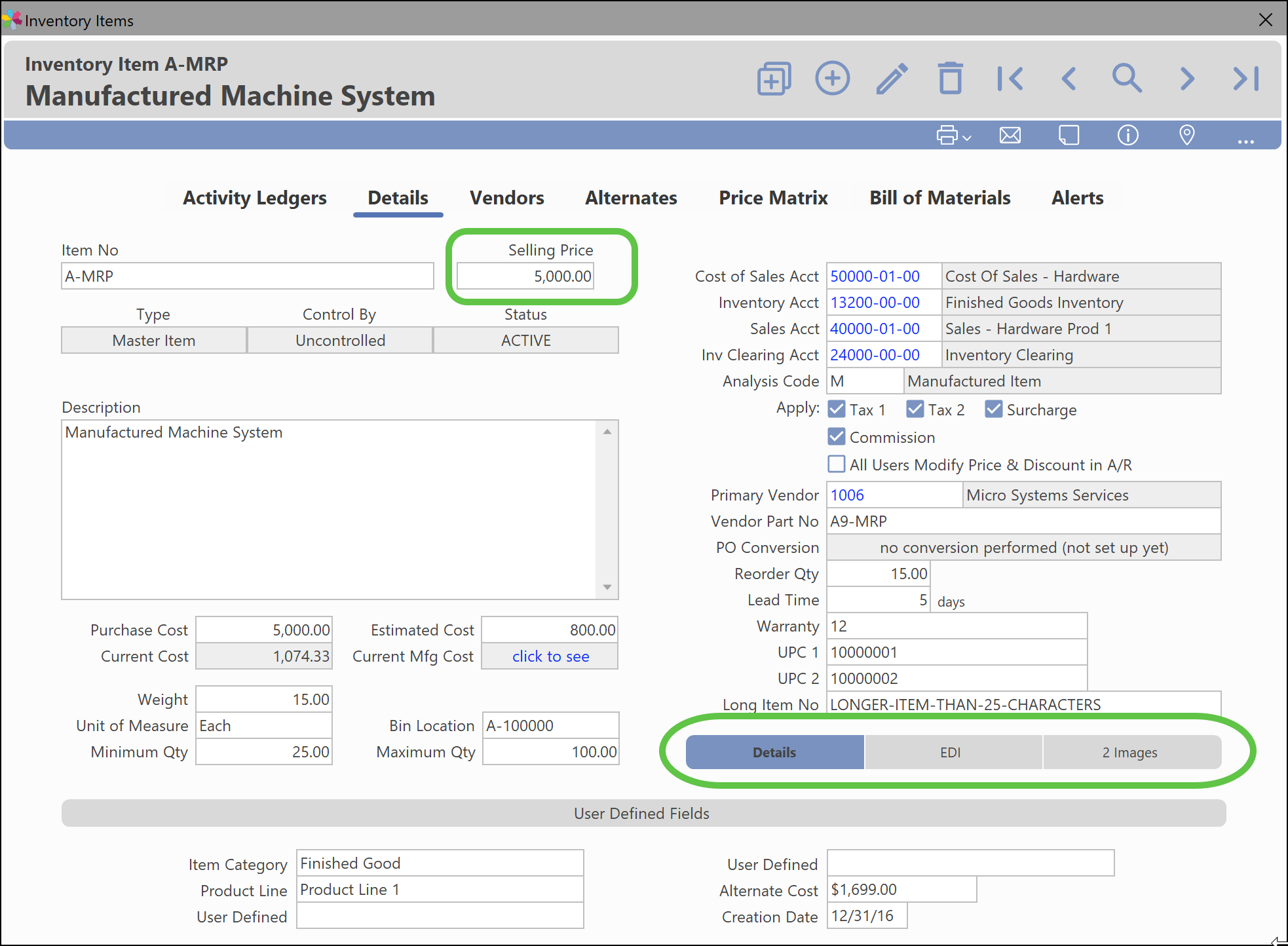
The inventory item window has been enhanced to accommodate the longer Item No field. Multiple layout changes were made to make inventory information easier to view and edit.
- When Inventory Item is editing, the Selling Price is now the first field to be accessed, making updates to the selling price even easier. The Selling Price is now more prominent and directly to the right side of the "Item No" field.
- Tab order has been adjusted to facilitate the field layout changes.
- Less used tabs like "EDI" and "Images" are nested in the bottom right, so they can be viewed only when needed.
An example of the new layout is shown below:
Windows and Reports Adjusted for Increase in Item No Field Length
The following transaction and report windows were edited to horizontally re-size the Item No field. This enhances the visibility when longer part numbers are used. Windows that have been adjusted:
- Inventory Popup list
- Inventory Window (Bill of Materials)
- Inventory Window (Alternates)
- Inventory Item Query
- Lot/Serial Numbers
- Work Orders Ledger
- Manufacture
- Receivings / Withdrawal
- Transfers
- Price Table
- All Inventory report windows
- Customer Window - Item Info Tab
- Account Invoice
- Recurring Invoice
- Quick Invoice
- Credit Memo
- Sales Order
- Sales Quote
- Customer Item History Report
- Customer Invoice Analysis Report
- Item Sales History
- Lot/Serial Sales Report
- Incomplete Orders Report
- Picking List Report
- Purchase Order
- Vendor Item History
- Buyers Report
- Expected Shipments
- Overdue Shipments
- (PO) Receivings Report
Data Transfer (aka Imports)
There are multiple import screens that were adjusted to facilitate the new part number length. Each is listed below:
- Inventory Item Import
- Inventory Count Import
- Bill of Materials
- Sales Orders
- Sales Quotes
- Account Invoices/Credit Memos
- Quick Invoices
- Purchase Orders
- Custom Price Tables
- Customer Price Lists
Was this article helpful?
That’s Great!
Thank you for your feedback
Sorry! We couldn't be helpful
Thank you for your feedback
Feedback sent
We appreciate your effort and will try to fix the article